
Help us help you. By posting the year, make, model and engine near the beginning of your help request, followed by the symptoms (no start, high idle, misfire etc.) Along with any prevalent Diagnostic Trouble Codes, aka DTCs, other forum members will be able to help you get to a solution more quickly and easily!
2008 Mazda 5 Cooling Fan Inoperative
- joshuamal
-
 Topic Author
- Offline
- Senior Member
-

Less
More
- Posts: 68
- Thank you received: 3
6 years 9 months ago #32005
by joshuamal
2008 Mazda 5 Cooling Fan Inoperative was created by joshuamal
Hello all,
I been working on a Mazda 5 someone bought from an auction and asked to replaced plugs, thermostat, belts, hoses, cv axle, brakes and today went I started it the fan wasn't coming on. When it reached normal temperature and supposed to be on it will move very very little back and forth but hardly see it moving, if i give it a hand push it will stay rotating as if it was running by hand real slow, hard to describe.
I used my power probe directly to the fan and it worked fine, normal so I then knew it wasn't the fan. There is a module where the fan connects to with two connectors, one comes off the fan itself 2 pins and the other a 3 pin, wires from relay/pcm, and the ground. The plug has three wires blk, red/wht, red . Before I tested the fan directly, for some reason I thought the fan connector was unplug but it wasn't, so I send power on the red/wht wire then afterwards, realized I was on the wrong connector, so went to the fan plug and power it up directly and worked. Then checked powers and grounds at the relay and were there, so then I send power from the load side of the relay and with test light on the red wire at the 3 pin connector of fan module and power was there too along with ground.
I'm debating if the fan module or PCM is at fault, perhaps I may have fried the driver when sending power on the red/wht wire. Please any inputs will be great, I can't communicate with old modis scanner which the software goes up to 2011 and don.t have the option for bi directional control on this vehicle to operate the fan.
How would you guys go about checking this into what may be wrong? Let me know your thoughts.
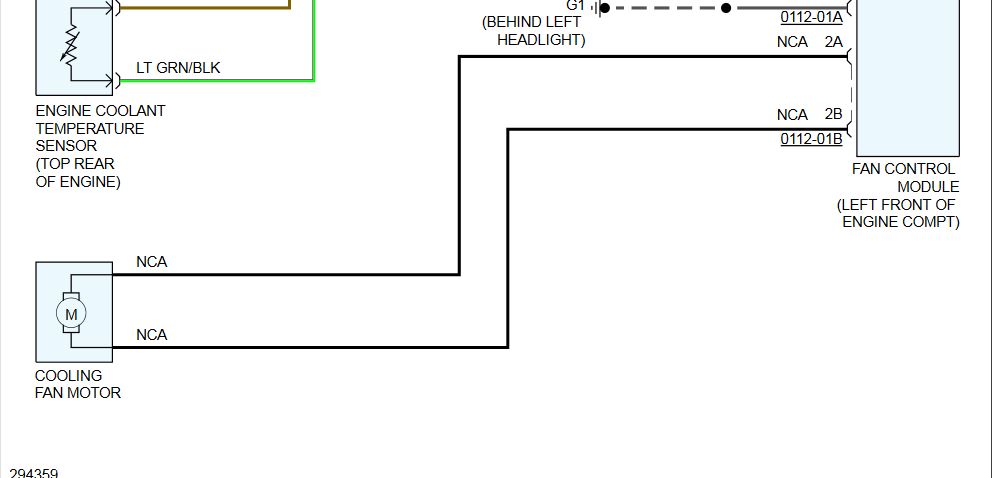
Perhaps if someone has access to the fan operations, a good electrical diagram up to PCM.
Thanks
I been working on a Mazda 5 someone bought from an auction and asked to replaced plugs, thermostat, belts, hoses, cv axle, brakes and today went I started it the fan wasn't coming on. When it reached normal temperature and supposed to be on it will move very very little back and forth but hardly see it moving, if i give it a hand push it will stay rotating as if it was running by hand real slow, hard to describe.
I used my power probe directly to the fan and it worked fine, normal so I then knew it wasn't the fan. There is a module where the fan connects to with two connectors, one comes off the fan itself 2 pins and the other a 3 pin, wires from relay/pcm, and the ground. The plug has three wires blk, red/wht, red . Before I tested the fan directly, for some reason I thought the fan connector was unplug but it wasn't, so I send power on the red/wht wire then afterwards, realized I was on the wrong connector, so went to the fan plug and power it up directly and worked. Then checked powers and grounds at the relay and were there, so then I send power from the load side of the relay and with test light on the red wire at the 3 pin connector of fan module and power was there too along with ground.
I'm debating if the fan module or PCM is at fault, perhaps I may have fried the driver when sending power on the red/wht wire. Please any inputs will be great, I can't communicate with old modis scanner which the software goes up to 2011 and don.t have the option for bi directional control on this vehicle to operate the fan.
How would you guys go about checking this into what may be wrong? Let me know your thoughts.
Perhaps if someone has access to the fan operations, a good electrical diagram up to PCM.
Thanks
Please Log in or Create an account to join the conversation.
- Tyler
-
- Offline
- Moderator
-

- Full time HACK since 2012
Less
More
- Posts: 6124
- Thank you received: 1541
6 years 9 months ago #32014
by Tyler
Replied by Tyler on topic 2008 Mazda 5 Cooling Fan Inoperative
Just to make sure I'm thinking of the right fan... On the three pin connector, the red and black are heavy gauge wires, correct? And the red/white is smaller?
If that's the case, the diagnosis is fairly straightforward. The red and black will have power and ground. Red/white will be a PCM controlled circuit. The fan control module provides 10-ish volts, and the PCM pulse width grounds it to command fan speed.
So, it's three checks. Power on red, ground on black, and some kind of square wave signal on the red/white with the fan commanded on. If in doubt, turn the A/C on. The longer the PCM grounds the signal, the faster the fan speed.
If you can watch the pulse width change (via scope or DMM, whichever), then the PCM and wiring are OK. Time for a fan assembly.
If that's the case, the diagnosis is fairly straightforward.
The red and black will have power and ground. Red/white will be a PCM controlled circuit. The fan control module provides 10-ish volts, and the PCM pulse width grounds it to command fan speed.So, it's three checks. Power on red, ground on black, and some kind of square wave signal on the red/white with the fan commanded on. If in doubt, turn the A/C on. The longer the PCM grounds the signal, the faster the fan speed.
If you can watch the pulse width change (via scope or DMM, whichever), then the PCM and wiring are OK. Time for a fan assembly.
Please Log in or Create an account to join the conversation.
- joshuamal
-
Topic Author
- Offline
- Senior Member
-
Less
More
- Posts: 68
- Thank you received: 3
6 years 9 months ago #32047
by joshuamal
Replied by joshuamal on topic 2008 Mazda 5 Cooling Fan Inoperative
Hello Tyler,
On the red and blk wire, Yes these are heavier gauge than the red/wht wire and had power and ground at the red and black wires. My scanner didn't give me an option for commanding the fan on or off, for some reason with the software in it it doesn't show that capability. How do I go about checking the pulse width or when and what should I see with DVOM at the red/wht wire? Is there a driver on the pcm for the fan module? I wonder if by sending 12V through that wire it may have fried the driver if it has one, any ideas?
The fan did work when I power it up directly with power probe so I know the fan is not the issue. My thoughts are the fan module or PCM driver if it has one.
When I tested the power and ground and fed the power through that wire, i had not tested the fan yet but was not coming on then after I noticed being on the wrong connector plug, I power it directly and worked at full speed as the fan only has two wires in it.
Let me know your thoughts.
Josh
On the red and blk wire, Yes these are heavier gauge than the red/wht wire and had power and ground at the red and black wires. My scanner didn't give me an option for commanding the fan on or off, for some reason with the software in it it doesn't show that capability. How do I go about checking the pulse width or when and what should I see with DVOM at the red/wht wire? Is there a driver on the pcm for the fan module? I wonder if by sending 12V through that wire it may have fried the driver if it has one, any ideas?
The fan did work when I power it up directly with power probe so I know the fan is not the issue. My thoughts are the fan module or PCM driver if it has one.
When I tested the power and ground and fed the power through that wire, i had not tested the fan yet but was not coming on then after I noticed being on the wrong connector plug, I power it directly and worked at full speed as the fan only has two wires in it.
Let me know your thoughts.
Josh
Please Log in or Create an account to join the conversation.
- joshuamal
-
Topic Author
- Offline
- Senior Member
-
Less
More
- Posts: 68
- Thank you received: 3
6 years 9 months ago #32048
by joshuamal
Replied by joshuamal on topic 2008 Mazda 5 Cooling Fan Inoperative
Hello Monde,
How do I check the signal from pcm to module and what should I see? Should I use the text light or using DVOM? Also, Not sure where the wire is at the pcm and where the pcm may be hidden at? Any ideas? Can you send me a wiring diagram for that?
How do I check the signal from pcm to module and what should I see? Should I use the text light or using DVOM? Also, Not sure where the wire is at the pcm and where the pcm may be hidden at? Any ideas? Can you send me a wiring diagram for that?
Please Log in or Create an account to join the conversation.
- joshuamal
-
Topic Author
- Offline
- Senior Member
-
Less
More
- Posts: 68
- Thank you received: 3
6 years 9 months ago #32049
by joshuamal
Replied by joshuamal on topic 2008 Mazda 5 Cooling Fan Inoperative
Tyler,
Are you able to send a wiring diagram of pcm showing the wire ? Not sure where the PCM may be located either. Let me know what you can.
Are you able to send a wiring diagram of pcm showing the wire ? Not sure where the PCM may be located either. Let me know what you can.
Please Log in or Create an account to join the conversation.
- joshuamal
-
Topic Author
- Offline
- Senior Member
-
Less
More
- Posts: 68
- Thank you received: 3
6 years 9 months ago #32050
by joshuamal
Replied by joshuamal on topic 2008 Mazda 5 Cooling Fan Inoperative
Tyler,
Are you able to send a wiring diagram of pcm showing the wire ? Not sure where the PCM may be located either. Let me know what you can.
Are you able to send a wiring diagram of pcm showing the wire ? Not sure where the PCM may be located either. Let me know what you can.
Please Log in or Create an account to join the conversation.
- Chad
-

- Offline
- Moderator
-
- I am not a parts changer.
Less
More
- Posts: 2181
- Thank you received: 732
6 years 9 months ago #32051
by Chad

"Knowledge is a weapon. Arm yourself, well, before going to do battle."
"Understanding a question is half an answer."
I have learned more by being wrong, than I have by being right.
Replied by Chad on topic 2008 Mazda 5 Cooling Fan Inoperative
"Knowledge is a weapon. Arm yourself, well, before going to do battle."
"Understanding a question is half an answer."
I have learned more by being wrong, than I have by being right.
Please Log in or Create an account to join the conversation.
- Tyler
-
- Offline
- Moderator
-
- Full time HACK since 2012
Less
More
- Posts: 6124
- Thank you received: 1541
6 years 9 months ago #32052
by Tyler
Replied by Tyler on topic 2008 Mazda 5 Cooling Fan Inoperative
Not having a bidirectional test for this fan isn't critical right now. For your purposes, just turning the AC on the highest setting with the engine running will cause the PCM to command fan operation.
Test the red/white wire with the AC off, engine running, your DMM set to voltage, and the fan connector plugged in. If there's no fan command from the PCM, the voltage will be high (10V or more). Now turn the AC on. Voltage should drop, possibly down to 7V or less.
Thr drop in voltage represents the PCM grounding that circuit, which is the fan module input to turn the fan on. That means the PCM works, and it's fan time.
Did you cook the PCM by powering that circuit? Maybe. It depends on the internals of the PCM, and if that fan command was on while you powered it. Checking voltage at the fan module as described above will help answer that question.
Test the red/white wire with the AC off, engine running, your DMM set to voltage, and the fan connector plugged in. If there's no fan command from the PCM, the voltage will be high (10V or more). Now turn the AC on. Voltage should drop, possibly down to 7V or less.
Thr drop in voltage represents the PCM grounding that circuit, which is the fan module input to turn the fan on. That means the PCM works, and it's fan time.
Did you cook the PCM by powering that circuit? Maybe. It depends on the internals of the PCM, and if that fan command was on while you powered it. Checking voltage at the fan module as described above will help answer that question.
Please Log in or Create an account to join the conversation.
- joshuamal
-
Topic Author
- Offline
- Senior Member
-
Less
More
- Posts: 68
- Thank you received: 3
6 years 9 months ago #32067
by joshuamal
Replied by joshuamal on topic 2008 Mazda 5 Cooling Fan Inoperative
Hello Tyler,
Greatly appreciate your feedback as I'm still learning electrical troubleshooting and with you guys advises in this forum has been grateful to me.
On your most recent comment, mentioned right below,
Test the red/white wire with the AC off, engine running, your DMM set to voltage, and the fan connector plugged in. If there's no fan command from the PCM, the voltage will be high (10V or more). Now turn the AC on. Voltage should drop, possibly down to 7V or less.
Thr drop in voltage represents the PCM grounding that circuit, which is the fan module input to turn the fan on. That means the PCM works, and it's fan time.
My question is, why the fan or what did you mean by fan time? Because when I put power directly to the fan it's working as it should be. I'm little confuse. Trying to make sure which way to go because the module is between $350-$450 and the fan assembly as well from auto part store.
Please educate me, help me understand. Are you able to chat over phone to help me understand?
Thanks
Josh M
Greatly appreciate your feedback as I'm still learning electrical troubleshooting and with you guys advises in this forum has been grateful to me.
On your most recent comment, mentioned right below,
Test the red/white wire with the AC off, engine running, your DMM set to voltage, and the fan connector plugged in. If there's no fan command from the PCM, the voltage will be high (10V or more). Now turn the AC on. Voltage should drop, possibly down to 7V or less.
Thr drop in voltage represents the PCM grounding that circuit, which is the fan module input to turn the fan on. That means the PCM works, and it's fan time.
My question is, why the fan or what did you mean by fan time? Because when I put power directly to the fan it's working as it should be. I'm little confuse. Trying to make sure which way to go because the module is between $350-$450 and the fan assembly as well from auto part store.
Please educate me, help me understand. Are you able to chat over phone to help me understand?
Thanks
Josh M
Please Log in or Create an account to join the conversation.
- Tyler
-
- Offline
- Moderator
-
- Full time HACK since 2012
Less
More
- Posts: 6124
- Thank you received: 1541
6 years 9 months ago #32068
by Tyler
Replied by Tyler on topic 2008 Mazda 5 Cooling Fan Inoperative
Sorry, didn't mean to confuse with 'fan time'. :blush:
I know you can get the fan and module separately? I tried that a few times, and got burned by premature failure of whichever part I didn't replace. So now I just suggest assemblies. If you're comfy with just doing a module, if that's what it needs, then by all means!
Email me your #, wrenchturnsyou@gmail.com.
I know you can get the fan and module separately? I tried that a few times, and got burned by premature failure of whichever part I didn't replace.
So now I just suggest assemblies. If you're comfy with just doing a module, if that's what it needs, then by all means!Email me your #, wrenchturnsyou@gmail.com.
Please Log in or Create an account to join the conversation.
- joshuamal
-
Topic Author
- Offline
- Senior Member
-
Less
More
- Posts: 68
- Thank you received: 3
6 years 9 months ago #32082
by joshuamal
Replied by joshuamal on topic 2008 Mazda 5 Cooling Fan Inoperative
Monde, great video thanks. That’s going to help me.
Please Log in or Create an account to join the conversation.
- Tyler
-
- Offline
- Moderator
-
- Full time HACK since 2012
Less
More
- Posts: 6124
- Thank you received: 1541
6 years 9 months ago #32092
by Tyler
Replied by Tyler on topic 2008 Mazda 5 Cooling Fan Inoperative
For anyone following along, this is an SD video relevant to this Mazda:
Please Log in or Create an account to join the conversation.
Time to create page: 0.323 seconds