
Door Will Not Lock - 2013 Volkswagen Passat TDI
- Kwazii
-
 Topic Author
- Offline
- New Member
-

- Posts: 6
- Thank you received: 0
I've been tinkering with electronic projects for over 20 years but I never had the opportunity to learn proper automotive electrical diagnostics. I've never used a test light, just a multi-meter. However, I had a chance to get an Icon digital test light/circuit tester (in picture) for a steal and I couldn't pass it up. I'm hoping you guys could walk me through this diag, and maybe put the new test light to use. How would you pros go about this? TIA!

Please Log in or Create an account to join the conversation.
- Tyler
-
- Offline
- Moderator
-

- Full time HACK since 2012
- Posts: 6129
- Thank you received: 1545

Unfortunately, your testing options are limited without removing the drivers door panel. The drivers door lock motor is run by the drivers door module, both beneath the door panel. If you had a full function scan tool, you could query the DDM for fault codes.
The only non-invasive test option you have is to find fuse #31 (30A) in Fuse Panel C and measure current across the fuse while hitting the door lock button. If you saw an increase of several amps across the fuse after hitting the lock button, I'd be confident in a binding actuator and go for replacement. If you saw no current change, you're back to pulling the panel.
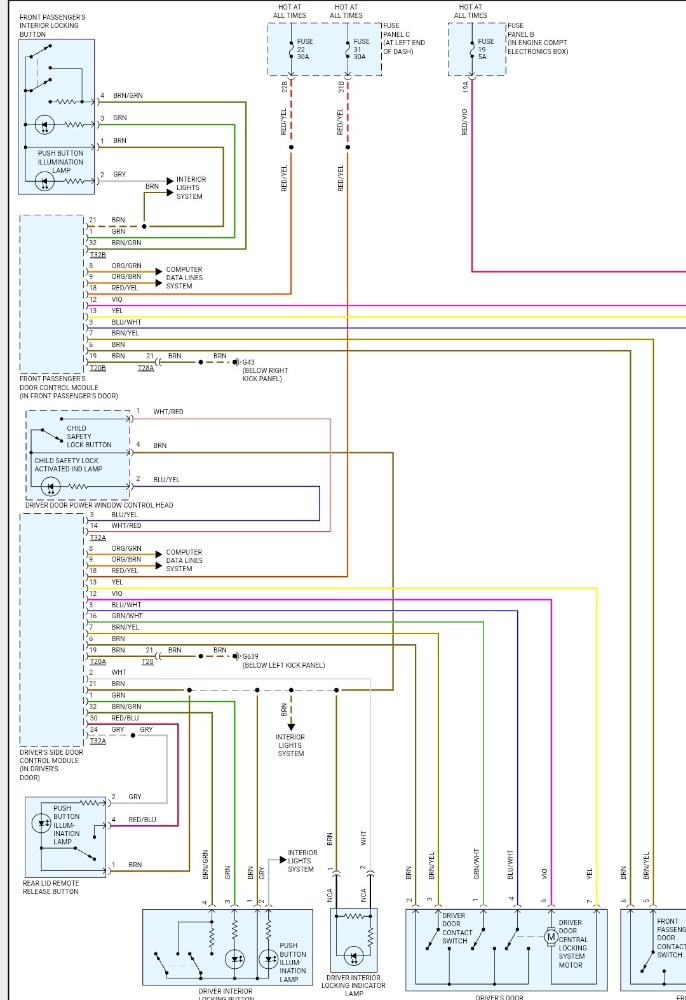
With the panel removed, find pin #12 violet and #13 yellow. Those go to the door lock motor. Hit the lock button while probing each wire with your test light connected to B-. Then probe each wire connected to B+. One wire should light on B-, the other on B+. You're checking for power and ground coming out of the DDM. If they're there, it's actuator time. If one or both is missing, stop and tell us so we can go down another path.
Please Log in or Create an account to join the conversation.
- Kwazii
-
Topic Author
- Offline
- New Member
-
- Posts: 6
- Thank you received: 0
Removing the panel is no problem, i already had it off to replace the switch. I do have a Ross-Tech HEX NET (VCDS) , which can probably do what you're saying. I just got it though so you'd have to walk me through it lolCongrats on the test light!
Unfortunately, your testing options are limited without removing the drivers door panel. The drivers door lock motor is run by the drivers door module, both beneath the door panel. If you had a full function scan tool, you could query the DDM for fault codes.
The only non-invasive test option you have is to find fuse #31 (30A) in Fuse Panel C and measure current across the fuse while hitting the door lock button. If you saw an increase of several amps across the fuse after hitting the lock button, I'd be confident in a binding actuator and go for replacement. If you saw no current change, you're back to pulling the panel.
With the panel removed, find pin #12 violet and #13 yellow. Those go to the door lock motor. Hit the lock button while probing each wire with your test light connected to B-. Then probe each wire connected to B+. One wire should light on B-, the other on B+. You're checking for power and ground coming out of the DDM. If they're there, it's actuator time. If one or both is missing, stop and tell us so we can go down another path.
I'll pull the panel and report back
Please Log in or Create an account to join the conversation.
- Kwazii
-
Topic Author
- Offline
- New Member
-
- Posts: 6
- Thank you received: 0
And while driving, sometimes it sounds like someone keeps pushing the lock/unlock button
Please Log in or Create an account to join the conversation.
- Tyler
-
- Offline
- Moderator
-
- Full time HACK since 2012
- Posts: 6129
- Thank you received: 1545
Kwazii post=92825 userid=48250
Removing the panel is no problem, i already had it off to replace the switch. I do have a Ross-Tech HEX NET (VCDS) , which can probably do what you're saying. I just got it though so you'd have to walk me through it lol
VCDS is perfect for this.
Oh yeah, I forgot to mention two things. When locked the red LED on the door panel flashes 7 times then stays illuminated.
Interesting. Can't say I've seen that before.
And while driving, sometimes it sounds like someone keeps pushing the lock/unlock button
That'd be a good time to watch DDM scan data with VCDS and see if there's a PID changing state during the sound.
Please Log in or Create an account to join the conversation.
- Kwazii
-
Topic Author
- Offline
- New Member
-
- Posts: 6
- Thank you received: 0
Please Log in or Create an account to join the conversation.
- Tyler
-
- Offline
- Moderator
-
- Full time HACK since 2012
- Posts: 6129
- Thank you received: 1545
When using VCDS, should the engine be running or off? I've heard conflicting things
Generally doesn't matter. Stuff like Auto Scan and reading scan data won't hurt anything. Keeping the engine running during Auto Scan is usually a good idea, IMO, as the scan can take several minutes depending on your settings and how many modules are on the car. If the battery is weak, it might be dead before the scan is done.
The only time it'd make a difference is if you were doing something specific, like a Basic Setting or Coding. Those have specific requirements for engine off or running, depending on what you're doing. Usually the function you're attempting will refuse if the vehicle is in the wrong condition.
Please Log in or Create an account to join the conversation.
- Kwazii
-
Topic Author
- Offline
- New Member
-
- Posts: 6
- Thank you received: 0
Please Log in or Create an account to join the conversation.
- Tyler
-
- Offline
- Moderator
-
- Full time HACK since 2012
- Posts: 6129
- Thank you received: 1545
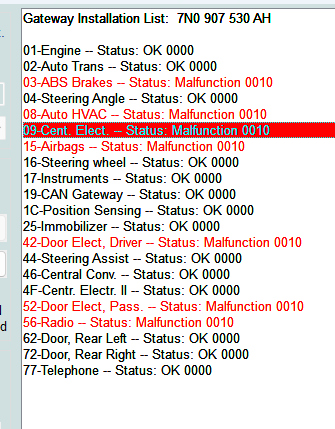
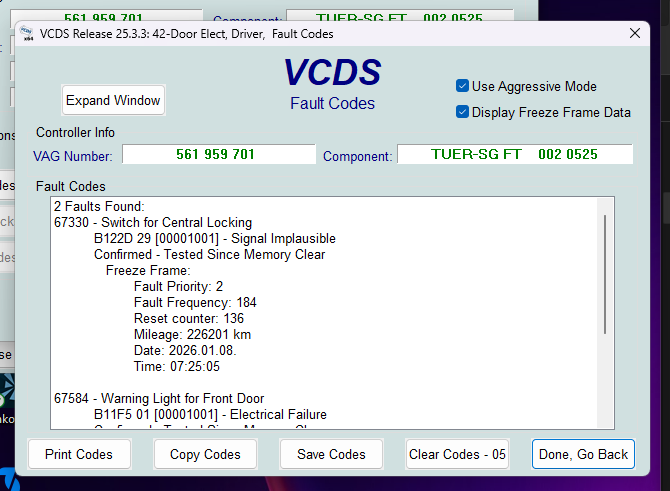
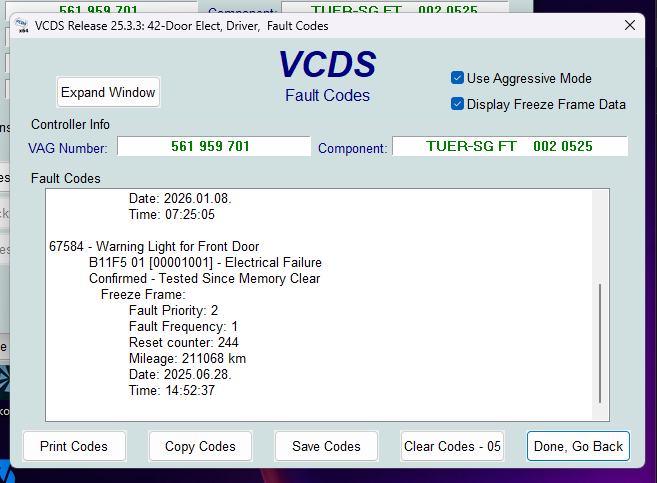
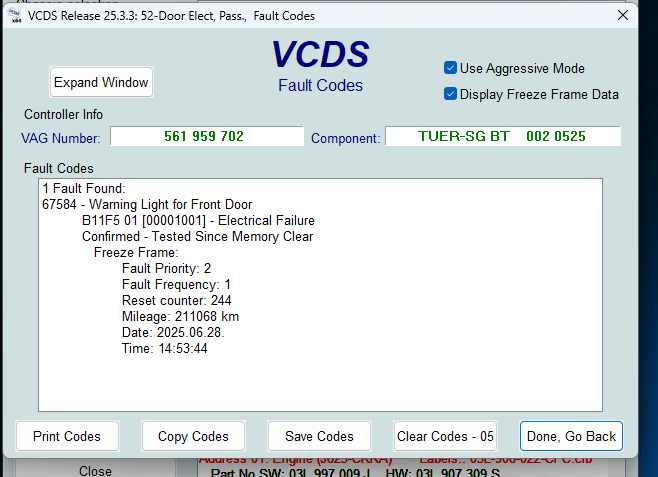
I did an auto scan and found a central locking error. The passenger door also had the same warning light error but I'm not sure if that's related.
Perfect! 67330/B122D is the one you want to follow. I'd ignore 67548 for now.
Because of how VW does its service information, there's no specific code set criteria for 67330. But on a guess, I'd say the Drivers Door Module isn't seeing the door lock motor switch (pin #4) change state when it commands the door lock motor off and on.
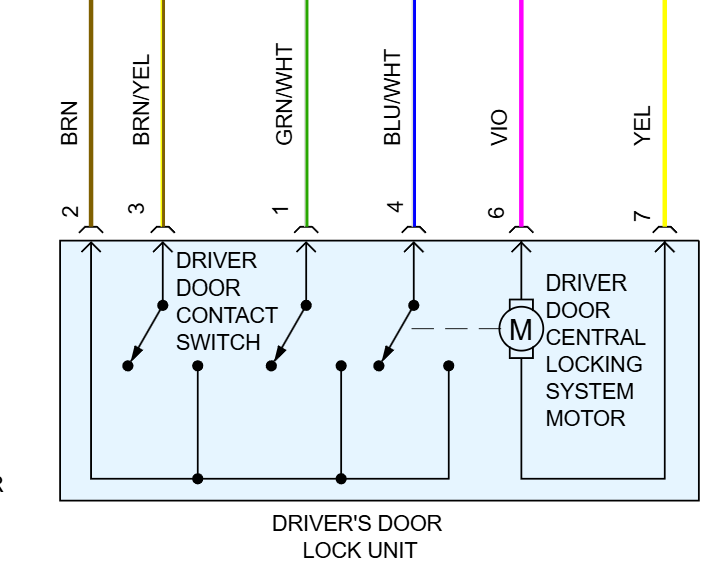
If pulling the door panel is NBD, then I'd do the pinpoint testing at the door lock motor connector with your test light. Or you could get a current clamp around one of the door lock motor wires, if you have one.
Please Log in or Create an account to join the conversation.